Bring AI Into Every Workday
Microsoft Copilot helps organizations use AI to improve productivity, automate tasks, analyze information, and support smarter business decisions.

What Is Microsoft Copilot?
Microsoft Copilot is an AI-powered assistant that uses natural language and advanced AI models to help users find information, create content, analyze data, automate tasks, and complete everyday work more efficiently.
Across the Microsoft ecosystem, Copilot can work within Microsoft 365, Power Platform, Dynamics 365, Microsoft Fabric, Azure, and other Microsoft services to provide AI-powered assistance based on the user’s context and available data.
Why Businesses Choose Copilot
Microsoft Copilot helps organizations reduce repetitive work, improve access to information, accelerate content creation, and enable employees to make better decisions with AI-powered assistance.
✓ Work Faster
✓ Find Information
✓ Create Content
✓ Analyze Data
✓ Automate Work
AI Across the Microsoft Ecosystem
Microsoft Copilot extends AI capabilities across Microsoft’s business platforms, allowing organizations to apply intelligent assistance where employees already work, from productivity and ERP to analytics, automation, and cloud services.



Microsoft 365
AI-powered productivity and collaboration.
Dynamics 365
AI assistance across business applications and customer processes.
Power Platform
Build applications, automate workflows, and create AI agents.
Microsoft Fabric
Use AI to explore, analyze, and work with business data.
Azure
Build and extend AI-powered solutions using Microsoft’s cloud platform.
Microsoft Copilot Experiences
Microsoft 365 Copilot
Bring AI assistance into Microsoft 365 using work context and organizational data users are authorized to access.
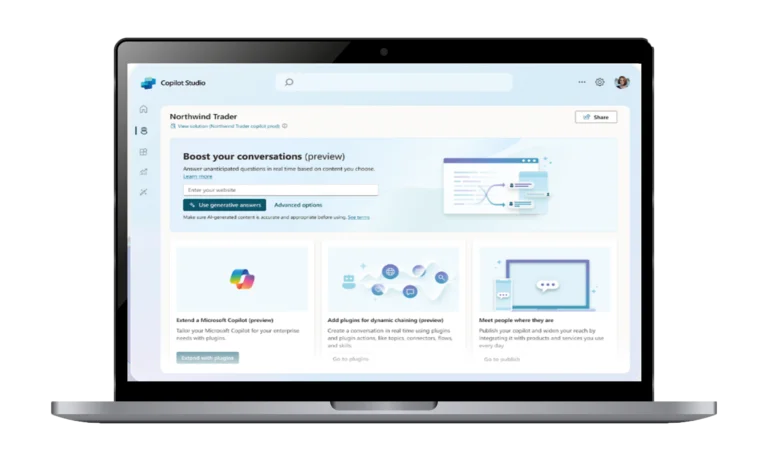
Copilot Studio
Create and customize AI agents that can interact with business data, applications, workflows, and users.
Copilot in Power Platform
Use AI to accelerate application development, workflow automation, data analysis, and business solution creation.
Copilot in Microsoft Fabric
Use AI-assisted capabilities to explore data, accelerate analytics, and support data engineering and business intelligence workflows.
Copilot for Dynamics 365
Bring AI assistance into business applications to help users work with customer, sales, service, finance, and operational information.
Copilot for Azure
Use AI assistance to help manage, understand, troubleshoot, and work with Azure cloud environments and resources.
How Microsoft Copilot Supports Your Business
Microsoft Copilot helps employees reduce time spent on repetitive tasks, search for information faster, and create business content more efficiently across everyday applications. It also enables organizations to use AI for data analysis, workflow automation, intelligent agents, and business processes, helping teams improve productivity and make more informed decisions.
Microsoft Copilot for Business

Productivity & Collaboration
Help employees create, summarize, communicate, & collaborate more efficiently across everyday business apps.

Finance & Management
Support financial analysis, reporting, information summarization, and faster management decision-making.

Sales & Marketing
Assist with content creation, customer insights, research, campaign planning, and sales activities.

Operations & Supply Chain
Help teams access operational information, analyze processes, and improve repetitive business workflows.

Data & Analytics
Use AI to explore business data, identify insights, summarize findings, and support data-driven decisions.

Customer & Employee Experience
Create AI-powered assistance that helps employees and customers find information and complete tasks faster.
From Copilot to AI Agents
Copilot provides AI assistance, while agents can take more focused actions within defined business processes. Organizations can use Microsoft Copilot and Copilot Studio to create AI-powered experiences that retrieve information, interact with systems, and automate specific tasks.
✓ Employee Agents
✓ Customer Agents
✓ Business Process Agents
✓ Knowledge Agents
Seamlessly Connected to Your Business Systems
Microsoft Copilot can work alongside the systems and applications your organization already uses, helping connect AI assistance with business data, workflows, productivity tools, and enterprise applications.
✓ ERP Integration
✓ Microsoft 365 Integration
✓ Power Platform Integration
✓ Data & Analytics Integration
✓ Business Application Integration
Why Choose MikroOne?
MikroOne combines Microsoft technology expertise, business process knowledge, ERP experience, data analytics capabilities, and AI expertise to help organizations adopt Copilot as a practical business solution. We help businesses move from AI experimentation to secure, measurable, and scalable AI adoption.


Ready to Bring AI Into Your Business?
Move beyond AI experimentation and build practical Copilot solutions that improve productivity, automate processes, and help your teams work smarter.
Frequently Asked Questions
What is Microsoft Copilot?
Microsoft Copilot is an AI-powered assistant that helps users create content, find information, analyze data, automate tasks, and work more efficiently.
What is Microsoft 365 Copilot?
Microsoft 365 Copilot is an AI-powered productivity tool integrated with Microsoft 365 applications and capable of using organizational content that users are authorized to access.
What is the difference between Microsoft Copilot and Microsoft 365 Copilot?
Microsoft Copilot is the general AI assistant experience, while Microsoft 365 Copilot provides additional AI capabilities integrated with Microsoft 365 applications and authorized organizational data.
What is Copilot Studio?
Copilot Studio is a Microsoft platform for creating and customizing AI agents that can interact with business data, applications, workflows, and users.
Can Microsoft Copilot work with business data?
Yes. Microsoft 365 Copilot can use organizational content that the user has permission to access, while specific Copilot experiences and agents can connect to additional business data sources.
Can Copilot integrate with Dynamics 365 Business Central?
Yes. Copilot experiences can be used across Dynamics 365 and Microsoft business applications, with capabilities depending on the specific product, licensing, and configuration.
Can MikroOne implement Microsoft Copilot?
Yes. MikroOne can support Copilot consulting, Microsoft 365 Copilot adoption, Copilot Studio development, AI agent development, integration, training, and ongoing support.
Can MikroOne build custom AI agents?
Yes. MikroOne can design and develop AI agents using Microsoft Copilot Studio and related Microsoft technologies based on specific business processes and requirements.
How can businesses start using Microsoft Copilot?
Businesses should first identify suitable use cases, assess data and security readiness, select the appropriate Copilot experience and licensing, then implement training, governance, and adoption processes.